
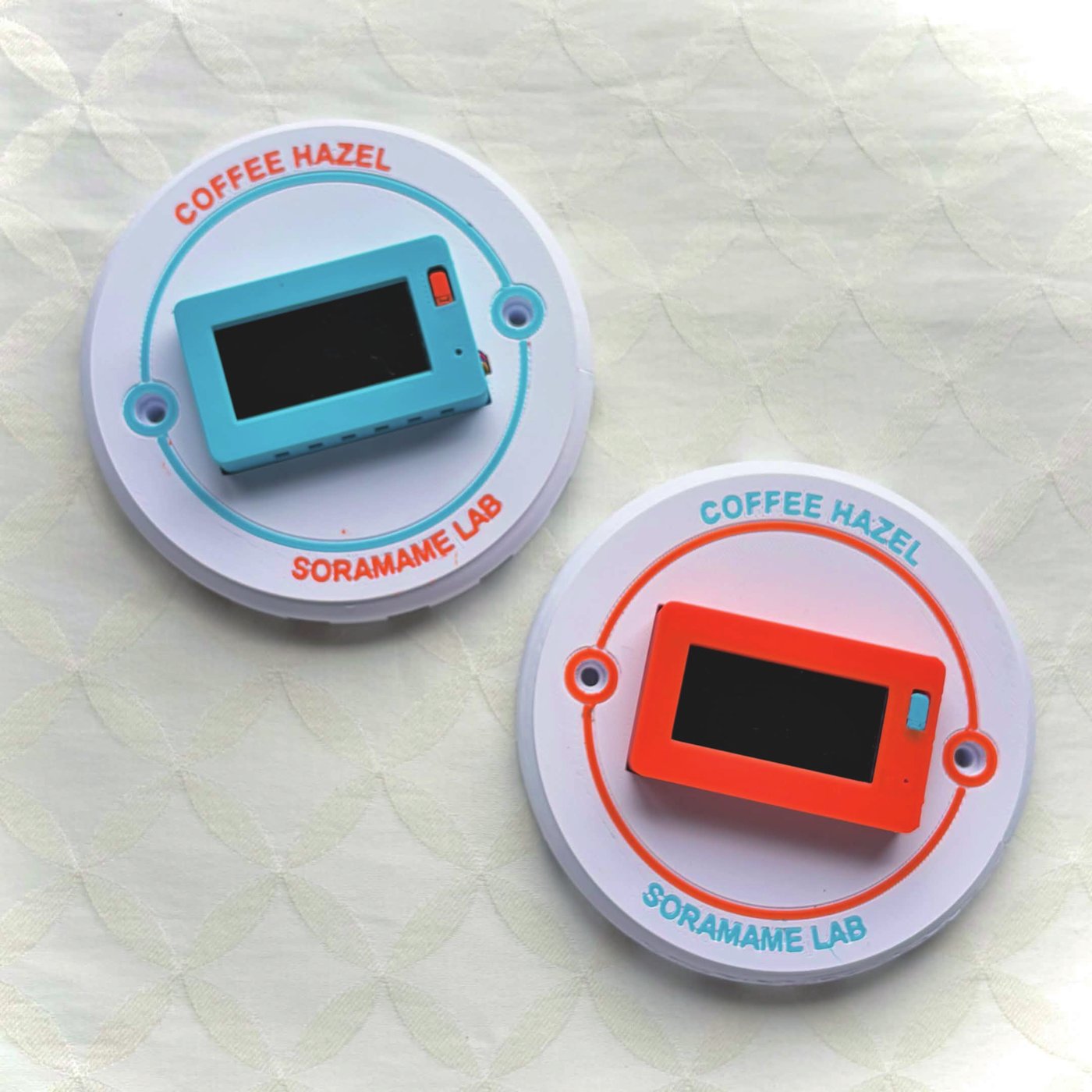
COFFEE HAZEL detects first crack during coffee roasting by sensing steam, giving you a reading of the moment that the sound alone cannot.
Steam sensing / Patent pending (JP 2026-177291) / Artisan integration
Please note: our shop and checkout are in Japanese, and we currently ship within Japan only. If you are outside Japan, please get in touch — we would like to hear from you. The Artisan settings file below is free for anyone to download and use.
Reading first crack through steam
About COFFEE HAZEL
What first crack is
As the water inside the bean’s cells is heated, pressure builds until the cell walls give way. That is first crack, and it comes with a sound. For a roaster that sound is a major landmark. But it is intermittent and often indistinct, and it changes with batch size and the number of beans in the drum, which makes it an unreliable marker. For a small micro roastery the difficulty is greater still.
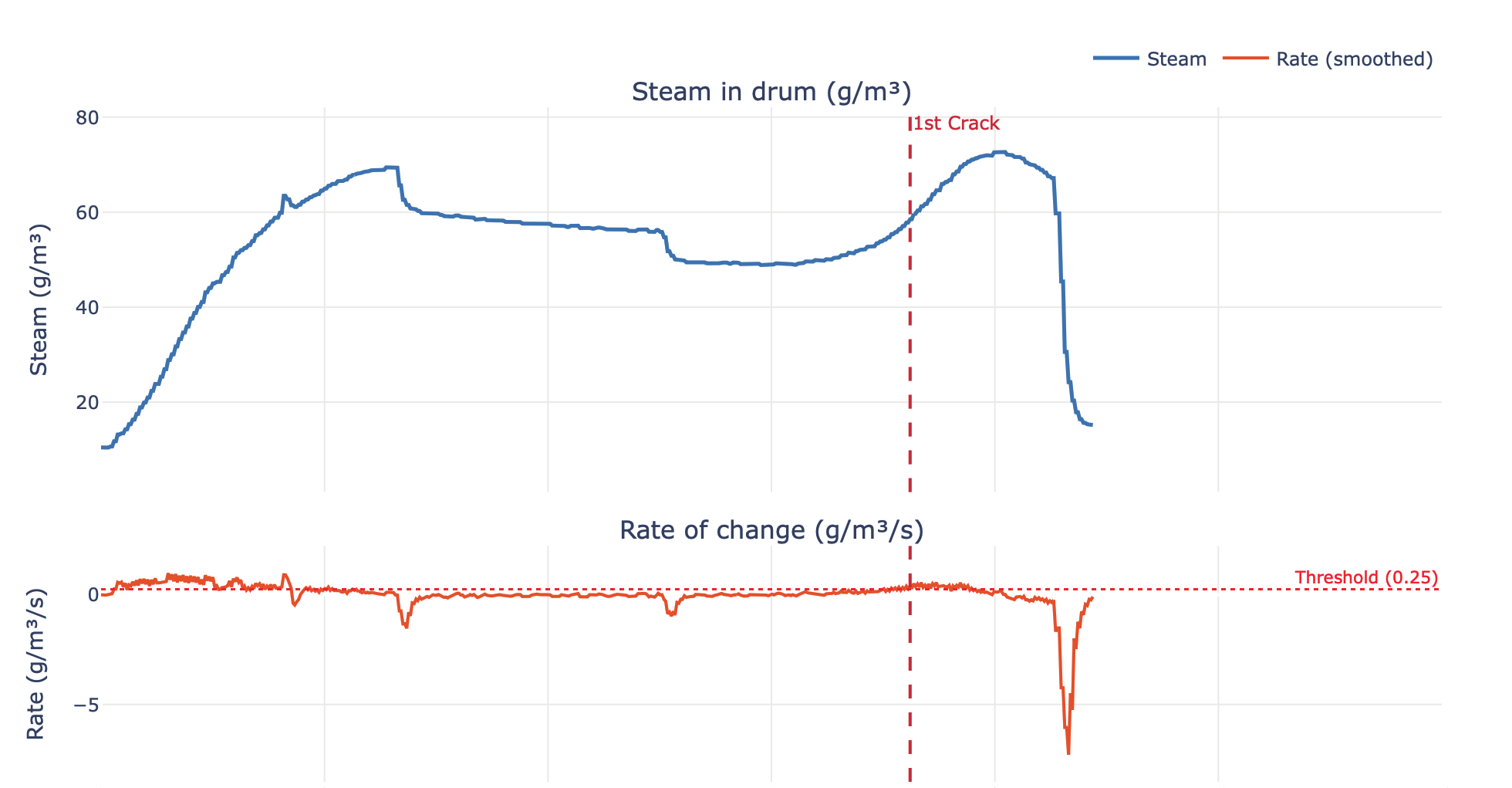
What first crack really is, is a release of steam. The popping sound is a by-product of it. We wrote about this in Why coffee beans crack.
Our approach
SORAMAME LAB looked instead at the steam in the roaster’s exhaust. Steam leaving the roaster is a direct, unambiguous signal of water leaving the beans. COFFEE HAZEL senses the rise in steam at first crack and alerts you. Using steam alongside the sound lets you place first crack more precisely, and makes a roast easier to repeat.
Beyond first crack
COFFEE HAZEL works with the roasting software Artisan. Steam appears on the same graph as your roast curve, so everything is in one place. No extra software is needed — the unit talks to Artisan directly.
Steam inside the drum matters beyond first crack. It takes part in heat transfer from the hot air, which means seasonal changes in humidity affect your roast in ways you can now observe and control.
What it looks like in Artisan
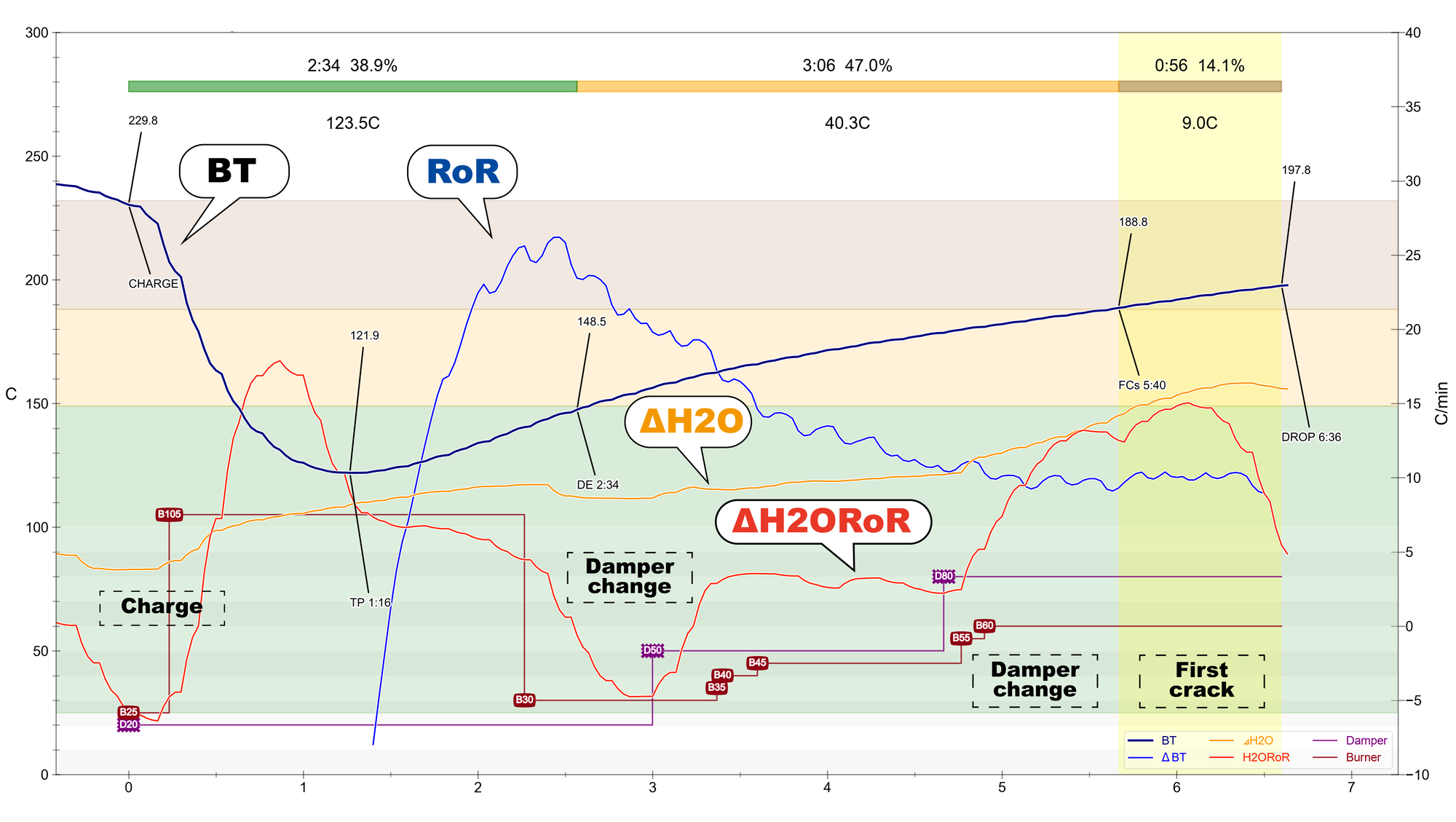
If you use Artisan, COFFEE HAZEL readings can be drawn on the same screen as your roast curve. The unit communicates with Artisan directly, so there is nothing to install in between. Load a free settings file, type in the unit’s IP address, and you are done.
What you get to see
Alongside humidity, temperature and water vapour density, Artisan gains ΔH2O — the absolute humidity difference between exhaust and intake — and its rate of rise. Because they share the time axis with bean temperature and RoR, you can read what the heat is doing against what the water is doing.
The rate of rise is calculated inside the unit. There is no virtual device or math expression to set up in Artisan.
What happens at first crack
Across 305 real roasts, the rate of rise climbed about 4.6 g/m³/min above baseline around first crack, and this appeared in 99% of the roasts. Baseline scatter is ±0.50 g/m³/min, so the change stands more than nine times clear of the noise.
Damper moves swing the rate of rise sharply, and that is not a fault. Change the airflow and the amount of steam really does change; the reading is telling you your adjustment landed. You can see this at each damper step in the graph above.
Your thermocouples stay as they are
If you already run Phidget or another probe in Artisan, you do not need to touch that setup. COFFEE HAZEL is layered on as extra sensors, so nothing about the way you record roasts today has to change.
Setting it up
Download the settings file below and load it from Help → Load Settings… in Artisan. Then open Config → Ports → WebSocket and type the IP address shown on the unit’s display into the Host field.
The IP address is the only thing you type by hand; the settings file fills in everything else. There is nothing to install, and no Python or other runtime to add. A step-by-step guide in English is included in the download.
A ZIP file containing the settings file (COFFEE_HAZEL.aset) and setup guides in English and Japanese. The guide also covers what to do if you already use Extra Devices.
Requirements
The procedure is the same on Windows, macOS and Linux. Artisan must be 4.0.2 or later (3.0.0 does not work). The COFFEE HAZEL unit needs firmware V2.3.0 or later, which can be updated from the unit’s own screen.
COFFEE HAZEL in 3D
Drag to rotate / scroll to zoom / right-drag to pan ・ Open full screen
What you need
| Roaster | A roaster with a chimney or exhaust duct. Exhaust temperature at the sensor position must be below 80°C. Please ask us if you are unsure. |
|---|---|
| Environment | Wi-Fi (2.4GHz), a USB Type-C cable, a USB power source, and a PC (macOS on both Intel and Apple silicon / Windows 10 and 11 / Ubuntu) |
| Radio | Wi-Fi 2.4GHz band (IEEE 802.11 b/g/n) |
| Radio certification | Certified for use in Japan (technical conformity number 211-221219). The unit is not certified for use in other countries. |
Watch the setup
Everything from mounting the sensor to taking the first readings. Worth a look before you buy, to see how much work it is. The narration is in Japanese; English subtitles are switched on by default.
Software
The desktop app “Coffee Hazel” works with the unit and is free, for macOS, Windows and Ubuntu. Download the .dmg, HazelSetup.exe or .deb to suit your system.
The app interface and the user guides are currently in Japanese. The Artisan setup guide is available in English.
Questions
macOS says “Coffee Hazel” cannot be opened because Apple cannot check it for malicious software
This is the standard macOS warning shown the first time you open an app that has not been notarised by Apple. There is nothing wrong with the app itself.
macOS 15 (Sequoia) and later
- Double-click once and dismiss the warning (do not choose “Move to Trash”)
- Apple menu → System Settings → Privacy & Security
- Scroll down to “Coffee Hazel was blocked” and click “Open Anyway”
- Confirm with your password or Touch ID
- From then on it opens normally
macOS 14 (Sonoma) and earlier
- Right-click Coffee Hazel in the Applications folder and choose “Open”
- Click “Open” in the dialog that appears
The app starts on Windows but no window appears
The WebView2 runtime is probably missing. Download the “Evergreen Bootstrapper” from the Microsoft Edge WebView2 page, install it, and restart the app.
Can I buy one outside Japan?
Not at the moment. The unit carries Japanese radio certification only, and we ship within Japan. We are interested in hearing from roasters abroad, so please write to us — it helps us decide where to seek certification next.
Anything else
Please get in touch. Our reply may be in simple English, but we will answer.